SSP Scholarship Status Check: You applied for your Karnataka scholarship. You submitted all your documents. Now you are waiting — and you have no idea what is happening.
The State Scholarship Portal’s SSP Scholarship Status Check feature allows every student to check the status of their scholarship. Now you can verify whether your documents are verified, your college has approved your application, and your DBT payment has been released — all at the click of a button.
This article shows you how to check your SSP scholarship status for pre-matric and post-matric scholarships. Also, you will learn what to do if you have to correct anything so that you can get your scholarship money deposited into your bank account.
How to Check SSP Scholarship Status (Pre-Matric)
If you are in Class 1 to Class 10, follow these steps to track the application status for the pre-matric scholarship.
- Go to the official SSP pre-matric portal.
- Click on Student Login on the home page.
- Enter SSP ID (User ID), password, and the captcha image that appears on the screen.
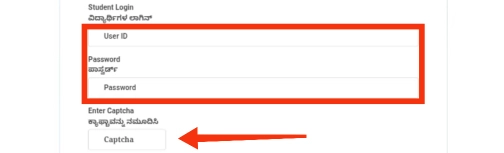
- After successful login, the dashboard will appear.
- Click on Student Status Report, which will appear on the profile or login menu.
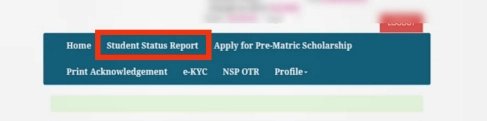
- Choose 2025-26 for Financial and Academic Year from the dropdown list.
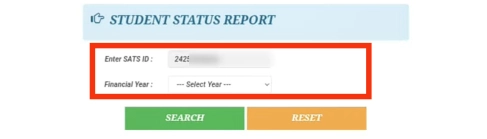
- Click on Search.
The application status will appear on the screen to show if the application is submitted, in under verification status, approved, or pending with a particular officer.
Check Student Status Report (Without Login)
This method is the most preferred, it is fast and does not require a password. If you have forgotten your SSP password, or you want a quick way to do this, you can use the Student Status Report on the SSP home page. You will just need your SATS ID.
To check the status from the SSP homepage:
- Access the SSP homepage on your browser
- Click the button that says “Track Student Scholarship Status”
- When the pop up appears, Select the Financial Year 2025-26
- Enter your SATS ID ( Student Achievement Tracking System ID)
- Click Search
- Your Application information will appear on the screen in a few moments
The status will confirm if it is Submitted or if it has been Verified or if there is a name mismatch for which the application cannot be processed.
How to Check SSP Scholarship Status (Post-Matric)
Many students apply for the Post-Matric scheme. You can find your application status on the student dashboard. Follow these simple steps to see if it’s approved or pending.
Post-matric requires a login. You cannot check without it. Follow these steps:
- Go to ssp.postmatric.karnataka.gov.in. Click the login link.
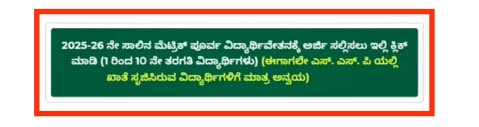
- Enter your SSP Student ID and password. Fill in the CAPTCHA code.
- On the dashboard, find “Year-wise Student Status“.

- Choose the academic year, such as 2025-26. Click “View“. It shows the verification status and payment details.
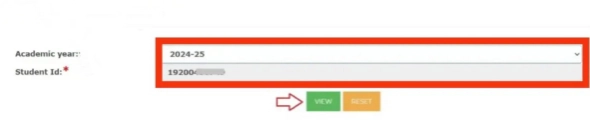
- The dashboard will show the current status of your application. This includes verification by your college, the district officer, and the Taluk officer.
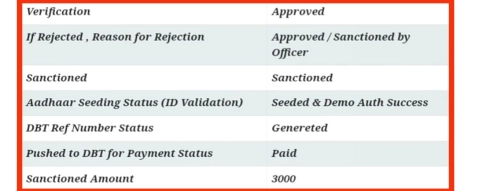
If the login fails, reset the password using your registered mobile. The page has a “Forgot Password” link.
How to Check SSP Payment Status (DBT)
Even after approval, many students wait for the money to reach their bank accounts. The SSP system uses Direct Benefit Transfer (DBT). This means the money transfers to your Aadhaar-seeded bank account.
To verify whether the payment has been released:
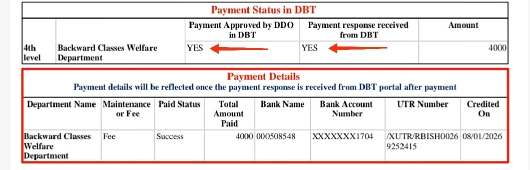
- Check Aadhaar Linking: Ensure you link your bank account to your Aadhaar number. If it is not linked (NPCI mapping), the SSP payment status will fail.
- Check Disbursement Status: Log into your SSP account. Find the “E-Payment Status” or “Push to DBT” column.
- Seva Sindhu: You can also check the DBT status via the DBT Karnataka app or the Seva Sindhu portal.
Note: If the status says “Push to DBT,” it means the scholarship department has sent the file to the bank. The amount usually credits within 7 to 15 working days.
Understanding Common Status Messages
When you run an SSP status check, you might see different terms. Here is what they mean:
- Pending at Verifying Officer: The documents are with a government officer. This could be at the district or taluk level. You do not need to do anything yet.
- Rejected due to Name Mismatch: The name on your Aadhaar card does not match your school records. You must correct this at your Aadhaar centre or school.
- Yes / No in e-Attestation: This reveals if your documents have been fetched. It includes caste and income certificates. It checks if they have come from the revenue department database.
- Maintenance / Fee Reimbursement: This breaks down the money. “Maintenance” is for your personal use. “Fee Reimbursement” usually goes straight to the college.
Frequently Asked Questions
This often happens if the server is down or if you selected the wrong financial year. Ensure you are checking for 2025-26 and that your internet connection is stable.
This link on the SSP home page lets anyone check their status with the SATS number. You don’t need a full login password.
Scholarships need 75% attendance. If your status shows a rejection for attendance, ask your college principal. They need to update the attendance data on the portal.


Leave a Reply to Musfera Anam Mohammad Saleem Sheikh Cancel reply