The SSP Scholarship Karnataka is an online scholarship portal operated by the Government of Karnataka. It enables students to submit applications for pre-matric and post-matric scholarships on a single portal.
Using this website, students can fill out application forms, upload documents, do eKYC, check the SSP scholarship status, and even get payment confirmation right on their phone or computer.
SSP Scholarship Karnataka – Quick Overview
| Scholarship Name | SSP Scholarship (State Scholarship Portal) |
| By | Government of Karnataka |
| Who Can Apply | Karnataka students from SC, ST, OBC, Minority & eligible categories |
| Courses Covered | Pre-Matric (Classes 1–10) & Post-Matric (PUC, UG, PG, Professional) |
| Application Mode | Online via SSP Portal |
| Residency Requirement | Must be a Karnataka resident |
| Scholarship Benefits | Fee reimbursement + maintenance/hostel allowance |
| Payment Method | Direct Benefit Transfer (DBT) |
| Helpline | 1902 |
What is SSP Scholarship Karnataka?
The government program SSP Scholarship centralizes numerous pre-matric and post-matric scholarships into one portal and essentially makes the entire scholarship process online. Once the scholarship application is sanctioned, the scholarship amount will be transferred directly to the student’s bank account through Direct Benefit Transfer (DBT).
100% Online
Complete application and tracking process via the SSP Portal.
Direct Payment
Funds are transferred directly to your Aadhaar-seeded bank account.
Unified Access
Covers SC, ST, OBC, Minority, and other departmental schemes.
Scholarship Eligibility & Income Criteria
To get the SSP Scholarship, you have to meet several criteria. These criteria may vary by scheme. First, the SSP Portal only considers permanent residents of Karnataka to be eligible for any scholarship.
| Category / Scheme | Family Income Limit | Minimum Academic Marks | Additional Requirements |
| SC (Scheduled Caste) | Up to ₹2.50 Lakh | Standard Pass | Full fee reimbursement & maintenance. |
| SC (Eng/Med Courses) | ₹2.50 L – ₹10 Lakh | N/A | Must admit via KCET, COMEDK, or PG CET (50% fee waiver). |
| ST (Scheduled Tribe) | Up to ₹2.50 Lakh | Standard Pass | Applies to post-matric scholarships. |
| Minority Communities | Up to ₹2.00 Lakh | 50% or above | Must have 50% in the previous examination. |
| Backward Class (Cat 1) | Up to ₹2.50 Lakh | 50% or above | Required for specific BC scholarships. |
| BC (Cat 2A, 3A, 3B) | Up to ₹1.00 Lakh | 50% or above | Lowest income threshold among categories. |
| Sainik School (Pre-Matric) | No Limit | N/A | Available to all students in classes 6–10. |
| Farmers’ Children | Not restricted by income | N/A | Father must be a registered farmer. |
An applicant in the school must be in a recognized school. Be sure to check the updated eligibility criteria on the official SSP Portal before you apply. The criteria can vary each year.
Documents Required for the Application
Being well prepared with the documents you need will make your SSP Scholarship application process go easier, using less time and effort. Whenever you want to apply, get all necessary documents ready to prove your identity, academic status, and eligibility.
For Pre-Matric Scholarship applications, collect these crucial documents:
- Identity verification: Aadhaar card (yours and parents’), SATS ID, passport-sized photograph
- Academic records: Previous year’s mark sheet, school leaving certificate, PUC number
- Financial documents: Bank passbook (Aadhaar-linked), income proof, admission fee receipt
- Category certificates: Caste certificate, EWS certificate (if applicable)
- Institutional proof: College ID with registration number, bonafide certificate from your institution
- Additional documents: Domicile certificate, disability registration number or UDID card (if applicable)
Note: For school students (Pre-Matric), the SATS ID is the main key to all the data; please be sure it is correct.
When you apply for post-matric scholarships, you need to provide:
- Mark sheet of your previous class
- Fee receipt of current tuition fees
- Bonafide certificate from your institution
- Aadhaar card (both yours and your parents’)
- Parents’ income certificate
- Caste/EWS certificate as applicable
- Hostel accommodation certificate (for hostellers)
SSP Scholarship 2025–26 Last Dates by Department
| Department | Pre-Matric (Last Date) | Post-Matric (Last Date) |
| Medical Education | N/A | March 31, 2026 |
| Social Welfare (SC) | March 15, 2026 | March 15, 2026 |
| Collegiate Education | N/A | February 28, 2026 |
| Minority Welfare | January 31, 2026 | March 15, 2026 |
| Backward Classes | March 31, 2026 | February 15, 2026 |
| Technical Education | March 31, 2026 | March 15, 2026 |
| Disability Welfare | January 31, 2026 | January 31, 2026 |
| Labour Department | March 31, 2026 | March 31, 2026 |
| Tribal Welfare (ST) | March 15, 2026 | March 15, 2026 |
| Brahmin Dev. Board | N/A | March 15, 2026 |
| Arya Vysya Board | N/A | March 15, 2026 |
| AYUSH Department | N/A | March 31, 2026 |
| Agriculture Dept | To be announced | To be announced |
Tip: Plan ahead. The portal might get sluggish or even stop working because of heavy traffic if you try to use it at the last minute.
How to Do E-KYC and E-Attestation Process
Before you send in your final scholarship application, you still have to do E-KYC (E-Aadhar-based Know Your Customer Verification) and, for post-matric students, E-Attestation. No E-KYC and E-Attestation; no scholarship application will be accepted. Let us see in detail about E-KYC.
What Is E-KYC?
E-KYC means Electronic Know Your Customer. It verifies your identity through your Aadhaar details. Your photograph will be fetched from the Aadhaar database and associated with your scholarship profile. This is the way the government makes sure genuine students are getting the money, not fake entries or fraudulent applications.
How To complete E-KYC:
- Log into the SSP portal using your SSP ID, name (exactly as in your Aadhaar), and gender.
- Look for the message “You need to complete your Aadhaar E-KYC to capture your photograph for scholarship purposes” and click the “Click for E-KYC“
button. - Enter your Aadhaar number at the Centre for e-Governance portal.
- Verify your identity through the OTP sent to your Aadhaar-linked mobile number.
- Confirm your displayed photograph by checking the “Displayed Photo is Correct” box and clicking “Save“.
If your photo is wrong, go to the nearest Taluk Office. Update your Aadhaar details before you proceed.
Once E-KYC is complete, post-matric scholarship applicants must also finish E-Attestation. During this process, you will upload academic documents. Your college’s Nodal Officer will verify these.
What Is E-Attestation?
E-Attestation is a service for college students after matriculation only. You submit your academic proof documents, and the Nodal Officer of your college digitally authenticates them. PUC, ITI, GTTC, and Select diploma students are not required to do this. Pre-matriculation students are absolutely excused.
How To complete E-Attestation:
- Visit eattestation.ssp.karnataka.gov.in and log in using your SSP credentials
- Review your automatically loaded student information and click “Confirm & Proceed”
- Select “Upload E-Attestation Documents” from your dashboard
- Choose document types from the dropdown menu, fill required details, and upload PDFs
- Submit all documents for verification by your college’s Nodal Officer
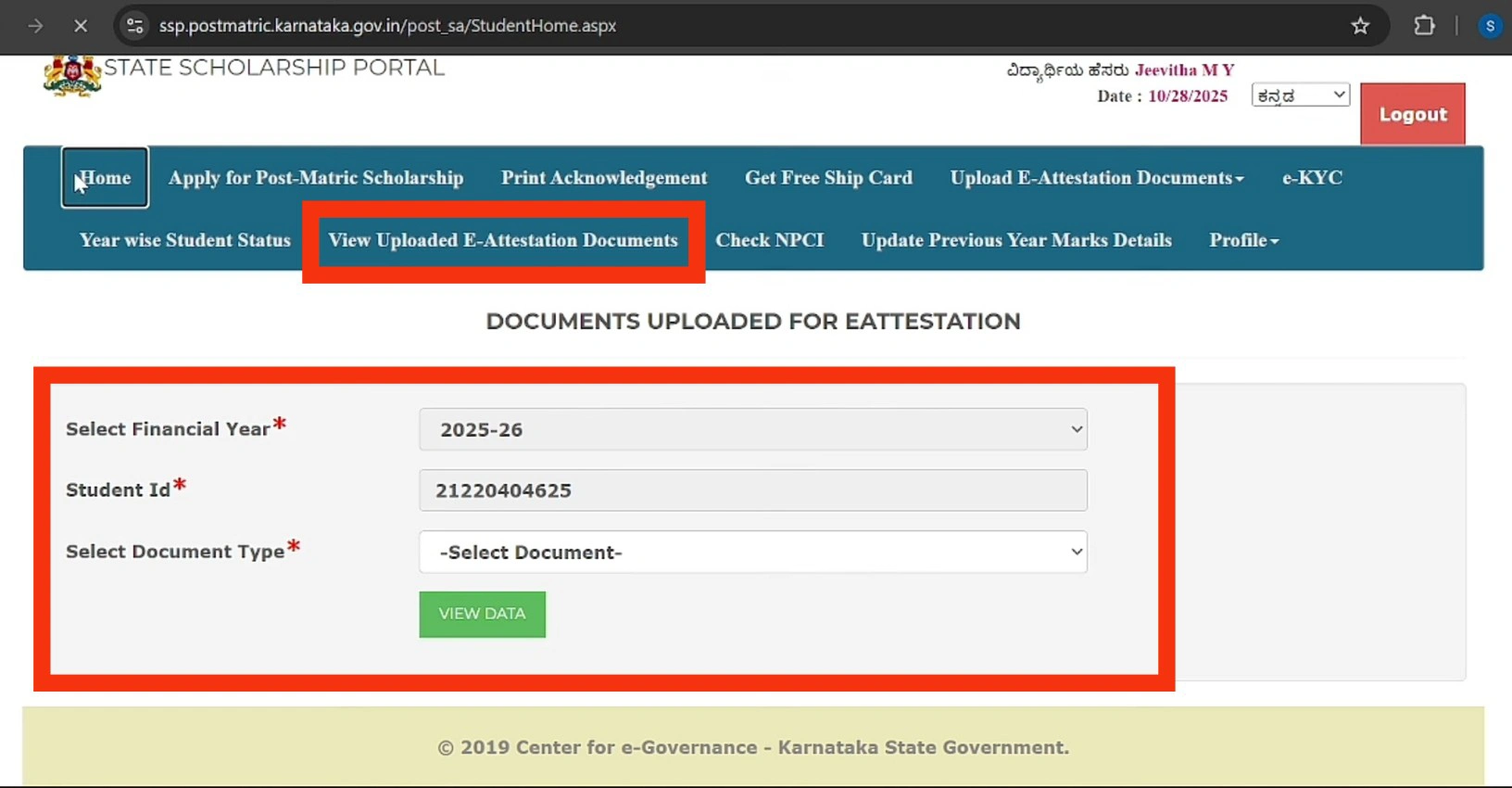
E-Attestation is a must for post-matric aspirants but not for PUC, ITI, GTTC, and some diploma students. Pre-matric students need not go for E-Attestation.
After verification, the system will generate Document IDs for each document verified successfully. Preserve the document IDs. You will have to enter these IDs in your final scholarship application.
Note: Do not share your SSP login ID and password with Cyber Cafe owners/strangers.
How to Create an Account on the SSP Portal
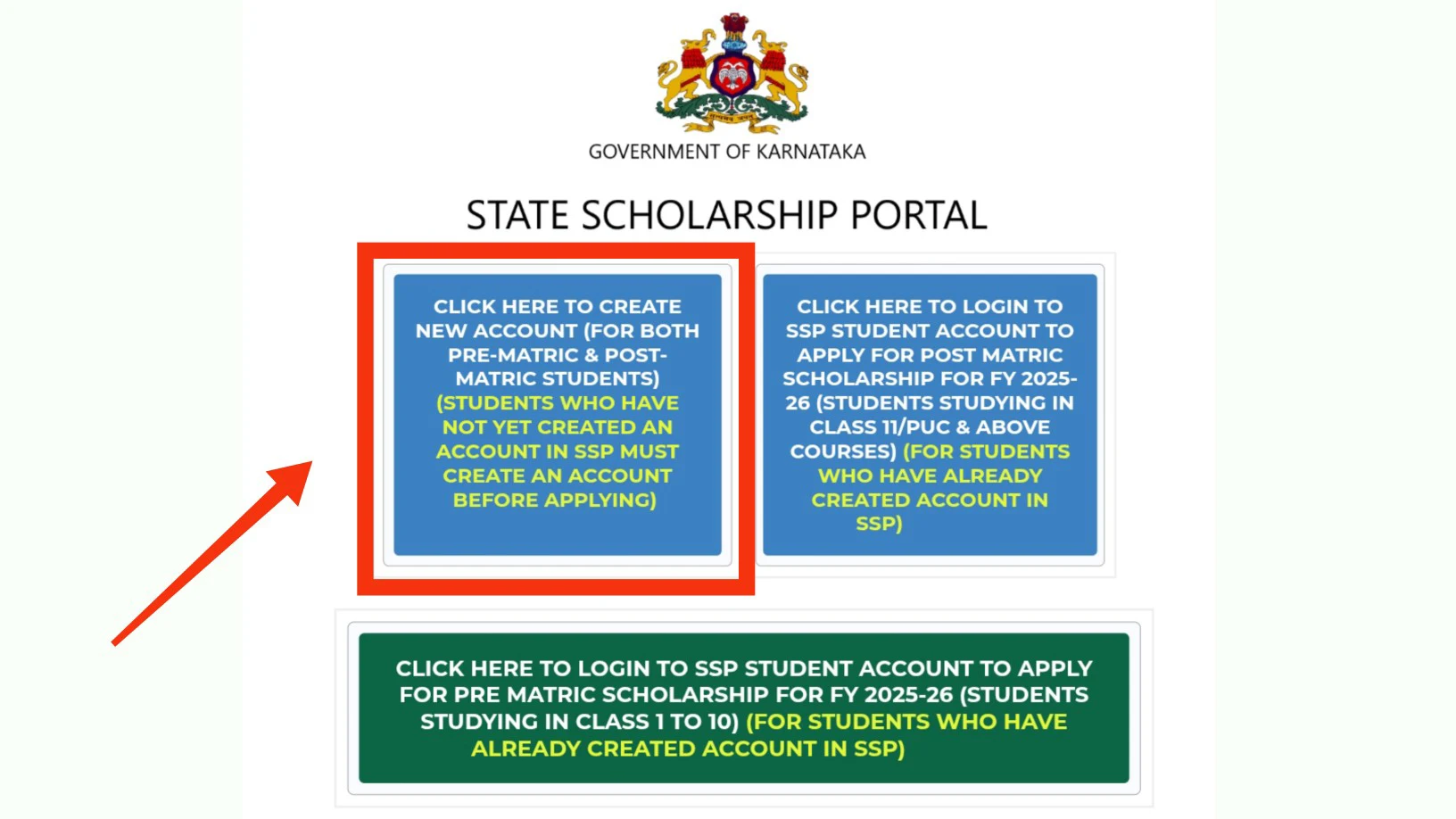
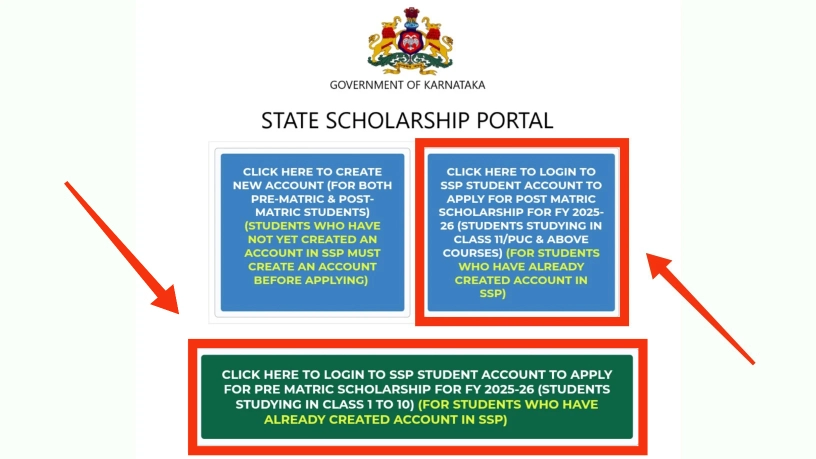
First, visit the official State Scholarship Portal website at ssp.karnataka.gov.in.
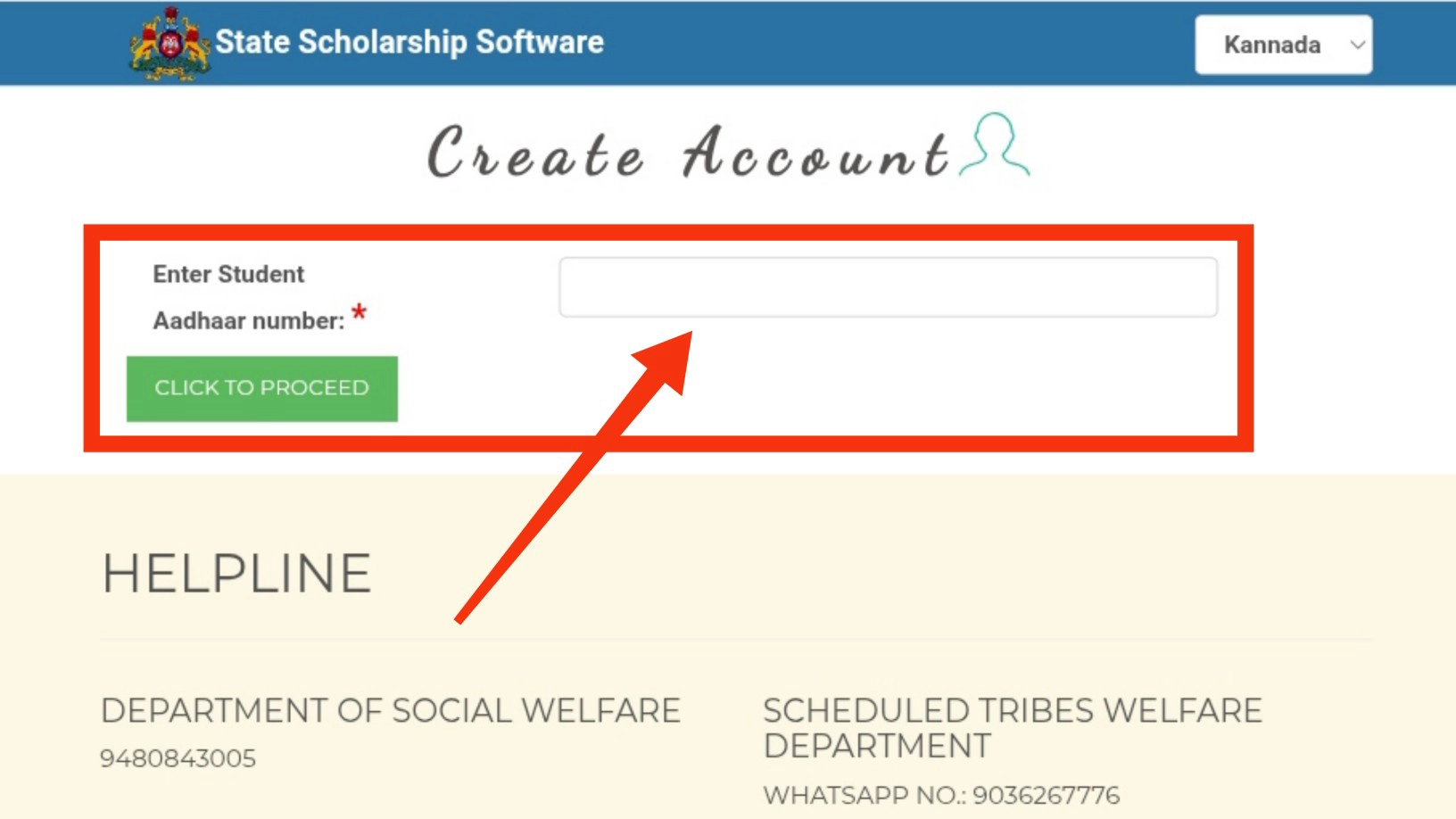
On the homepage, locate and click “CLICK HERE TO CREATE NEW ACCOUNT (FOR BOTH PRE-MATRIC & POST-MATRIC STUDENTS).” Next, you will need to enter your Aadhaar number and click “Proceed.”
Following this, a new page will open where you must:
- Enter your name exactly as printed on your Aadhaar card
- Re-enter your Aadhaar number for confirmation
- Check the consent box and click “Submit”
When you submit, choose your gender. Then, give your valid email and current mobile number. After clicking “Submit,” you will receive an OTP on your mobile. Enter this OTP and click “Submit” again.
Now create a strong password following these requirements:
- 8-15 characters in length
- At least one number
- At least one uppercase letter
- At least one lowercase letter
- One special character
- No spaces
After you register, you’ll get a confirmation message. Finally, check your mobile SMS for your User ID (SSP ID) and password, which you’ll use for all future logins.
Step-by-Step Guide to Apply for SSP Scholarship
Applying for financial aid through the SSP portal is a step-by-step process. First, create your account. Then, complete the E-KYC verification.
How to Apply Pre-Matric Scholarship
Step 1: Access Your Dashboard
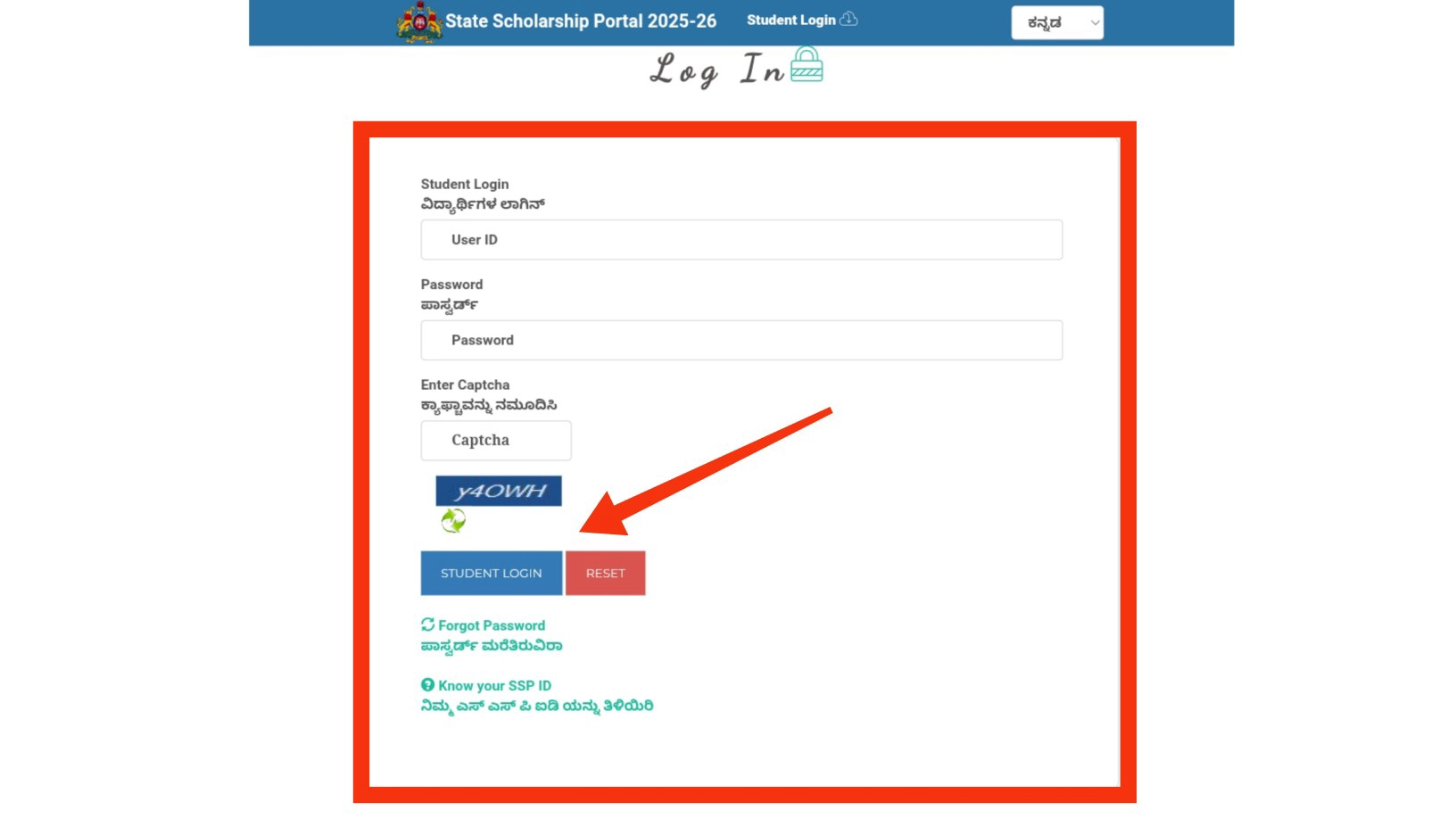
Log in to the SSP Portal using your registered username and password. Once logged in, look for the “Apply for Pre-Matric Scholarship” link on your student dashboard and click it to begin.
Step 2: Retrieve Student Data (SATS ID)
- Enter your SATS ID (Student Achievement Tracking System ID) in the designated field.
- Click the “Get Data” button.
- The system will automatically pull your school information, name, and academic details from the database. Verify that these details are correct.
Step 3: Enter Caste and Income Details
Input your socio-economic information accurately to determine eligibility:
- Parent’s Occupation: Select your parent’s current profession.
- Religion & Caste: Select your specific category.
- Certificate Numbers: Enter the RD Numbers from your valid Caste and Income certificates.
Step 4: Provide Personal & Contact Information
Fill in your current residential details to ensure proper communication:
- Location: Select your District and Taluk.
- Postal Code: Enter your 6-digit PIN code.
Step 5: Confirm Domicile and Hostel Status
- Domicile: Confirm whether you are a permanent resident of Karnataka.
- Hostel Status: Indicate if you are currently residing in a government-funded hostel or if you are a day scholar.
Step 6: Review and Final Submission
- Preview: Carefully review the application summary. Check for any typos in your RD numbers or SATS ID.
- Final Submit: Once you have verified all information, click the “Final Submit” button.
Mandatory: All post-matric and pre-matric students in OBC, SC, and ST categories need an NSP OTR number. They must get this number before submitting their SSP application.
How to Apply Post-Matric Scholarship
Step 1: Dashboard Login & Mandatory E-KYC
- Visit the official SSP Post-Matric Portal.
- Log in using your SSP ID and password.
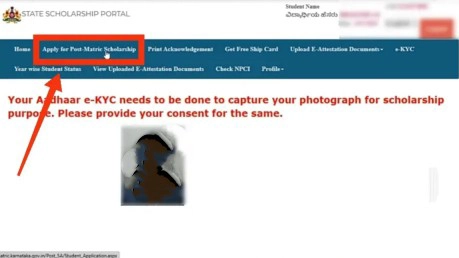
- Mandatory: Complete your Aadhaar E-KYC if prompted. This verifies your identity and captures your photograph from the Aadhaar database.
Step 2: Verify SSLC/PUC Academic Data
- Click on “Apply for Post-Matric Scholarship.”
- The system will automatically display your basic information based on your SSLC or PUC registration numbers.
- Review these details carefully; if they are correct, click “Save & Proceed.”
Step 3: Enter Location & Domicile Details
Provide your current residential and constituency details:
- Location: Select your District, Taluk, and Assembly Constituency.
- PIN Code: Enter your 6-digit postal code.
- Domicile: Confirm your status as a Karnataka Resident by selecting “Yes.”
Step 4: Caste and Income Verification
- Enter the RD Numbers from your valid Caste and Income certificates.
- Click “Check” or “Get Data” to allow the system to fetch and verify your category and income status directly from the Revenue Department records.
Step 5: Confirm College & Course Information
In most cases, the portal fetches your college data automatically from the university database.
- Verify: Check the College Name, Course, and Discipline.
- Manual Entry: Enter your Course Start Date and Admission Mode (e.g., CET, Management, or Govt Quota).
Step 6: Residential Status & Final Submission
- Hostel Status: Indicate whether you are a Day Scholar or residing in a Government/Private Hostel.
- Preview: Review the entire application summary for accuracy.
- Submit: Click “Final Submit.”
- Download: Always download and print the Acknowledgement Receipt. You may need to submit a copy to your college’s nodal officer.
How to Check Your SSP Scholarship Status
Regularly monitor your SSP scholarship progress once the application is done. As a pre-matric or post-matric student, you are expected to monitor your application progress anytime after submission. Any of these methods will show you your payment status without much stress.
Post-Matric Scholarship Status (Login Required)
For post-matric students (PUC, Degree, PG, etc.), the status check is integrated into your dashboard for security.
- Visit the Portal: Go to the official SSP Post-Matric Portal.
- Login: Click on “Post-Matric Login.” Enter your Student ID, Password, and the Captcha code shown on the screen.
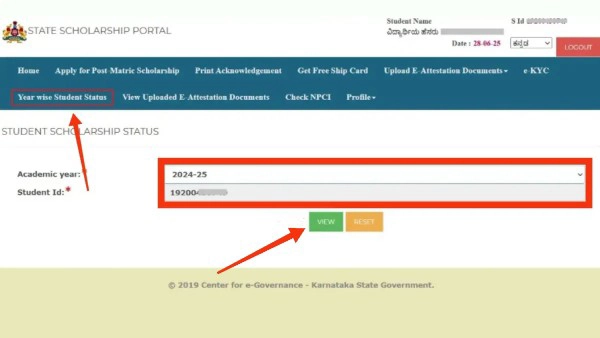
- Navigate to Status: Once logged in, find and select the “Year Wise Student Status” link on your student dashboard.
- Filter Details: Select the current academic year (e.g., 2024-25 or 2025-26) and click “View.”
- Review the Report: You will see a detailed table showing:
- Maintenance Amount: Money credited for your living expenses.
- Fee Reimbursement: Funds sent directly to your college.
- DBT Status: Look for “Pushed to DBT,” which means the payment is being processed.
Pre-Matric Scholarship Status
Pre-matric students (Class 1 to 10) can check their status using two different methods.
Option A: Quick Status Check (No Password Needed)
This is the fastest method and does not require you to remember your login credentials.
- Visit the Site: Go to the SSP Pre-Matric Portal.
- Select Status Report: On the homepage, click the link titled “Click here to know Pre-Matric Scholarship Status” or “Student Status Report.”
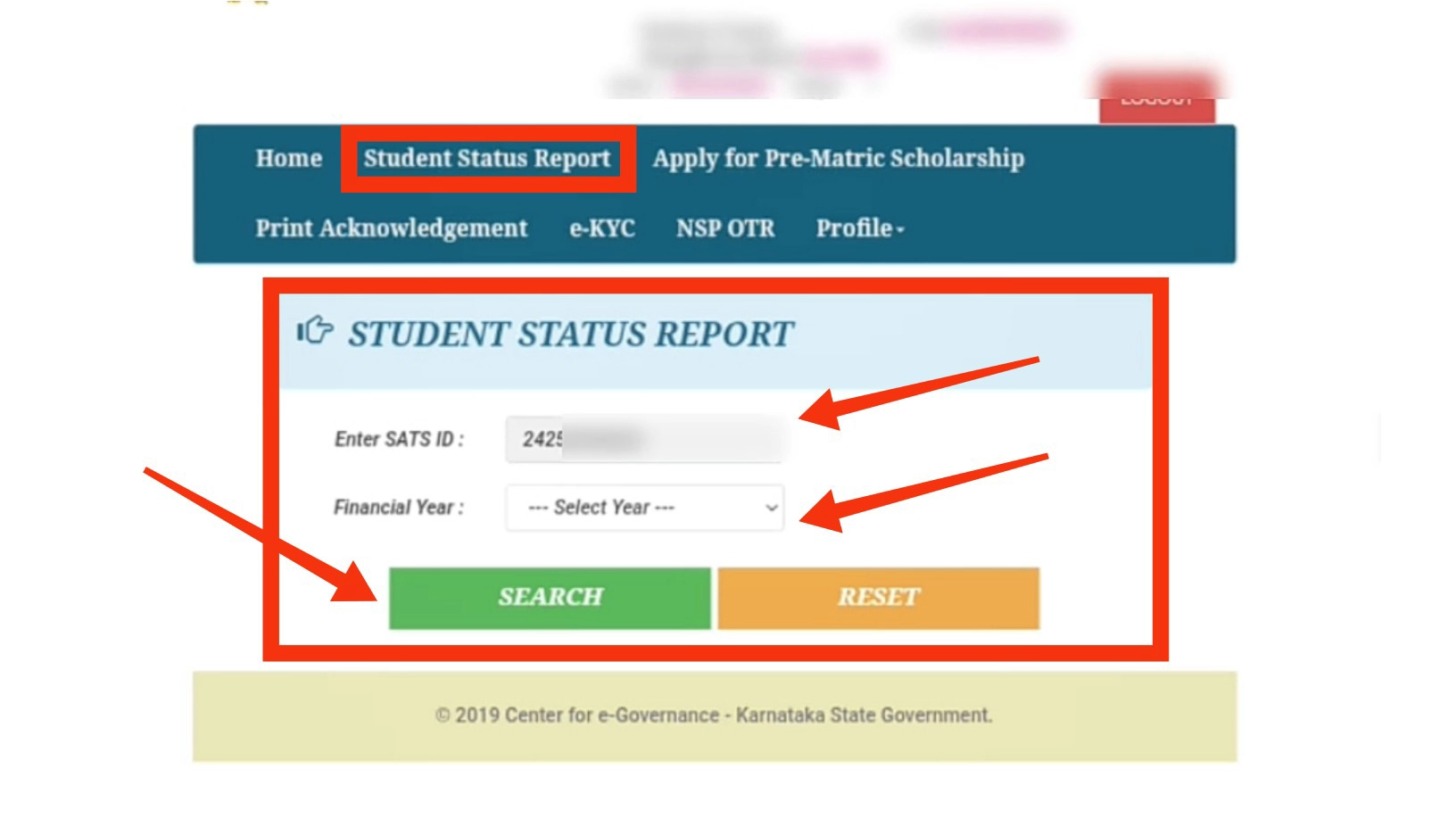
- Enter SATS ID: Provide your 9-digit SATS ID.
- Select Year: Choose the relevant Financial Year from the dropdown menu.
- Search: Click the “Search” button to view your application and payment progress instantly.
Option B: Dashboard Login
If you need to edit your profile or view more detailed history:
- Log in to the Pre-Matric portal using your User ID and Password.
- Click on the “Student Status” or “Track Status” tab on your dashboard.
SSP Scholarship Renewal Process
Always renew your educational funding through the SSP scholarship. It is expected of every beneficiary to renew their scholarships in order to keep this essential help. Continuous financial support is guaranteed for a specific period after renewal.
To complete your renewal:
- Access the SSP portal using your previous year’s Application ID and password
- Select the renewal option from your dashboard
- Update only minimal necessary details for the current academic year
- Upload fresh supporting documents, including your latest fee receipt and updated mark sheet
- Review all information thoroughly
- Submit your renewal form officially
To renew, you need these documents:
- Aadhaar card
- SATS ID
- Updated income certificate
- Caste certificate
- Bank passbook
- Recent academic records
Frequently Asked Questions – (FAQs)
Managed by the Government of Karnataka, the SSP Scholarship provides financial aid to students of SC, ST, OBC, minority, and economically backward classes. To be eligible, you should be a domicile of Karnataka and fulfill the income marks and course eligibility criteria of your respective category.
For the detailed category-wise eligibility criteria, check out Section Scholarship Eligibility & Income Criteria of this guide.
Visit ssp.karnataka.gov.in and hit on “Create New Account.” Put in your Aadhar number, fill out your basic details, and set a powerful password, and with OTP you can verify your mobile.
Required Documents: Aadhaar card, last year’s mark sheet, income certificate, caste certificate, bank passbook, and admission fee receipt. Post-matric applicants may require additional documents, such as a bonafide certificate from their college/institute.
Post-matric students log in to the SSP portal and select “Year Wise Student Status.” Year-wise student status is the next step; then select the academic year and click on “View.” pre-matric Students will be able to use “Student Status Report” on the portal against entering their SATS ID. They can also check their status through their account dashboard.